For title agencies and escrow offices

Keep every closing file out of the inbox.

LetterGuard gives every file a private room for messages, documents and signatures. Information sheets and payoff authorizations come in on time, closing documents get reviewed before the table, and wiring details stay out of the email threads scammers watch.

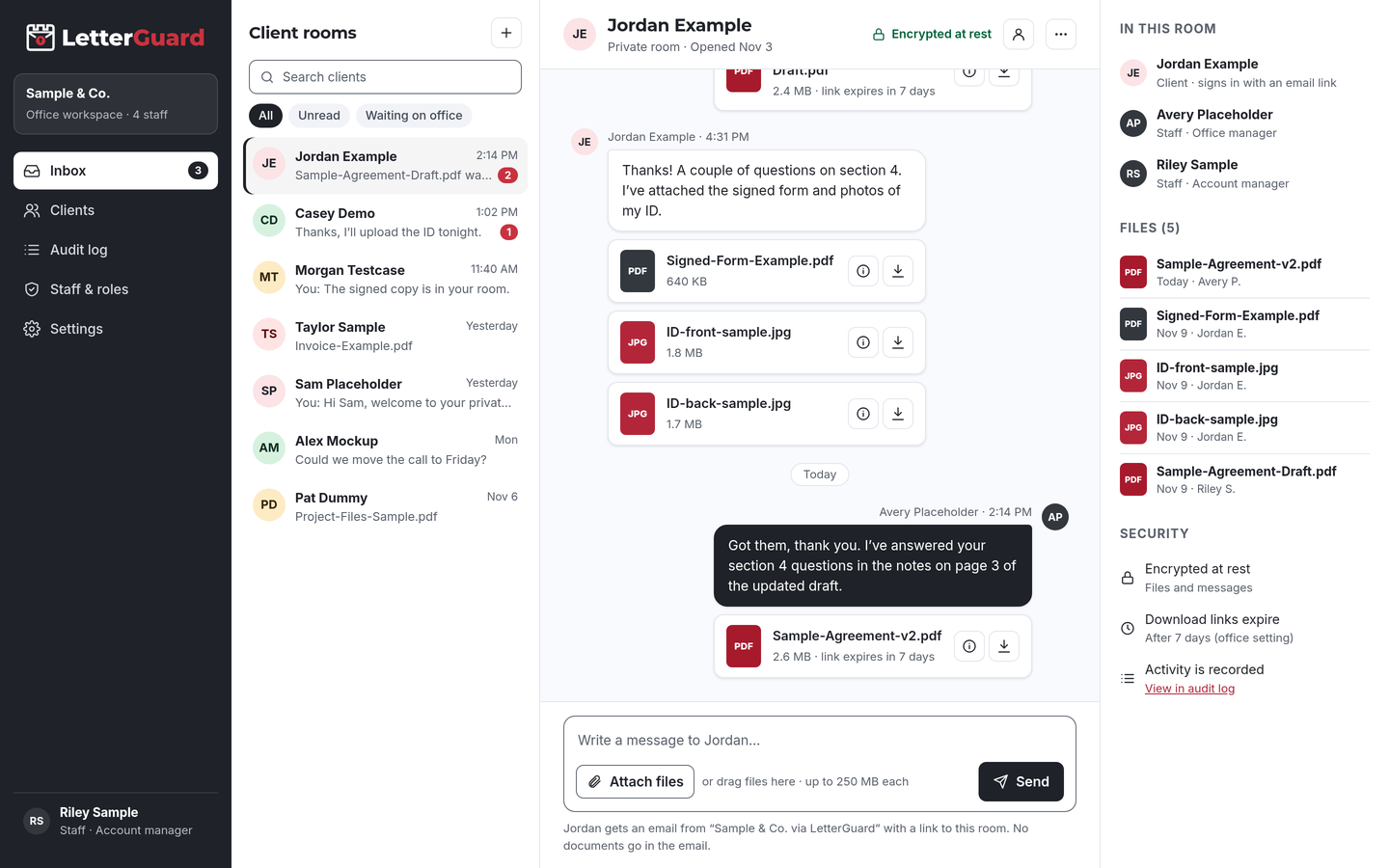
The LetterGuard client room: a list of client rooms, a conversation between office staff and a client with PDF and image attachments, and the room’s members, files and security settings.

The problem

Email is the weakest link in a closing

A single closing involves buyers, sellers, agents, lenders and your team. Most of that traffic still runs through ordinary email.

  • Too many parties, too many threads

    Information sheets, IDs, payoff authorizations and trust documents come from different people in different threads. Your processor stitches the file together and hopes nothing was missed.

  • Last-minute documents

    Missing seller information or an unsigned authorization surfaces the day before closing, and your team spends it on the phone instead of preparing the file.

  • Sensitive data in plain email

    Social Security numbers, bank account numbers and loan details travel as attachments and linger in every inbox they touched, long after recording.

  • Wire fraud targets your files

    Real estate fraud drew 9,359 complaints and $173.6 million in reported losses in 2024, with criminals sending fake wiring instructions by email.Source: FBI IC3, 2024 Internet Crime Report

How it fits your week

From open order to recording

Keep your title production and escrow accounting software. LetterGuard handles the documents and conversation with the parties to the closing.

Opening the file

  1. When an order opens, invite the buyer and seller to their rooms. Busy week? Invite parties in bulk.
  2. Each party gets an email from your office, signs in with a one-time code and uploads information sheets, IDs and payoff authorizations from a phone.
  3. Uploads show up in your team’s single inbox for every room, so the file starts complete instead of in pieces.

The outcome

A complete opening package in one place, without personal data sitting in email.

Clearing title requirements

  1. Post what you need in the room: trust certifications, entity documents, a death certificate, a corrected ID.
  2. Parties upload as they find each item. Executable and macro files are blocked, and Professional plans scan every upload for malware.
  3. Send authorizations and acknowledgments for signature in the room. Signed copies stay with the file.

The outcome

Requirements cleared in one thread, with a record of when each document arrived.

Closing disclosure and wiring

  1. Share the documents each party should review before closing. They preview them in the browser without downloading a copy.
  2. Post wiring instructions in the party’s room instead of email, and tell them to confirm by calling a phone number they already know.
  3. Answer questions about figures and timing in the room, where every party sees the same answer.

The outcome

Parties arrive prepared, and wiring details stay out of email, with phone verification still in place.

After recording

  1. Share final documents in each party’s room, then export your data to keep with your records.
  2. Download links expire on their own, so old documents aren’t reachable from forwarded emails.
  3. The access record shows who uploaded or downloaded each file, and when, for your plan’s retention period.

The outcome

A clean close-out, and a record of how sensitive documents were shared.

By transaction type

The documents each closing really needs

Every room works the same way. What changes is who’s involved and what they send.

  • Residential purchases

    Buyer and seller information sheets, IDs, payoff authorizations

    Collect each party’s details in their own room, so nobody sees another party’s personal information.

  • Refinances

    Borrower information, payoff authorizations, insurance information

    Gather payoff and borrower details quickly, with fewer calls to chase missing items.

  • Commercial closings

    Entity documents, operating agreements, authority resolutions, estoppels

    Invite every signer and decision-maker to one room, so the entity paperwork arrives together.

  • Trusts and estates

    Trust certifications, death certificates, letters testamentary

    Collect sensitive family documents privately, with a record of who accessed them.

  • Sellers out of the area

    IDs, information sheets, mail-away instructions

    Remote sellers upload from a phone and see every update in their room.

  • For sale by owner

    Purchase agreements, IDs, payoff information

    Give unrepresented parties one clear place for their documents and questions.

  • 1031 exchanges

    Exchange agreements, assignment documents, identification forms

    Keep exchange paperwork with the rest of the file, shared only with the people who need it.

  • Different kind of file?

    If your office trades documents with buyers, sellers or borrowers, a room works the same way. We’ll walk through it in a demo.

    Book a demo
Works with how you work

Keep your title software. Add a room for each file.

There’s nothing to migrate and nothing to connect. LetterGuard works alongside the tools your office already uses.

  • Title and escrow software

    Production, escrow accounting and recording stay where they are. Final documents go into your file as they do today.

  • Your email

    Keep email for everyday coordination with agents and lenders. Parties get an email notice when there’s something new, and the notice never contains the message or the file.

  • Phone verification

    Keep calling to verify wiring details with a known number. LetterGuard keeps the written details out of email; it doesn’t replace the call.

Protecting nonpublic personal information

Reasonable steps you can point to

Industry best practices for title and settlement companies call for a written program to protect nonpublic personal information and for wire procedures that keep consumers from acting on emailed instructions.

LetterGuard gives your office practical protections to use for party documents, and a record of how files were shared, which you can describe in your own program.

LetterGuard doesn’t certify or guarantee compliance with any best-practice framework, underwriter requirement or law, and nothing here is legal advice. Notarized and recorded documents still follow your state and underwriter requirements.

  • Files and messages encrypted at rest
  • Parties sign in with a one-time email code
  • Two-factor login for staff
  • Role-based staff access
  • Download-only files with links that expire
  • A record of who downloaded each file, and when
  • An audit log of account activity
  • Executable and macro files blocked

Compare

Email, shared links or a room for every file

QuestionEmail attachmentsShared drive linksLetterGuard
Where the file conversation livesSpread across each person’s inboxEmail, with files somewhere elseOne room per party, messages and files together
Who can open a documentAnyone the email reaches or is forwarded toDepends on how the link was sharedRoom members who sign in with a code
Wiring detailsSitting in an inbox scammers may be watchingMixed in with other shared filesPosted in the room, verified by phone
Who downloaded whatNo recordVaries by service and settingsRecorded on every file, with the time
AuthorizationsPrint, sign, scan, sendA separate toolSigned in the room, with the copy kept there
Old links and copiesCopies stay in every inboxLinks work until someone turns them offDownload links expire on their own
What a party needsAn inboxOften an account with the serviceAn email address and a one-time code

Questions title and escrow offices ask

How should a title company send wiring instructions securely?

Not by plain email. Post them in the party’s private room and tell the party to confirm them by calling a number they already know, never one from an email. LetterGuard keeps the written instructions off email; the phone call is still the verification step.

What’s the safest way to collect seller and buyer information sheets?

Have each party upload them to a room only they and your team can reach after signing in. In LetterGuard, files are encrypted at rest, download-only, and recorded with who downloaded them, and when.

Does LetterGuard replace my title production software?

No. Keep your title and escrow software for production, accounting and recording. LetterGuard works alongside the tools you already use, with nothing to migrate.

Can parties sign closing documents in LetterGuard?

Parties can sign documents such as information sheets, authorizations and acknowledgments in their room. Documents that must be notarized or recorded still follow your state’s and underwriter’s requirements.

How do buyers and sellers log in without a password?

They enter their email address and type in the one-time code LetterGuard sends them. There’s nothing to install and no password to forget. Your staff sign in with two-factor login.

Can each party only see their own documents?

Yes. Give each party their own room, so a buyer never sees the seller’s information. Your staff work across rooms from one inbox, with role-based access.

Pricing

Per office, not per seat.

Unlimited staff on every plan, and clients never pay. Plans start at $99/mo.

See plans and pricing

Close files without the email risk

Bring one real closing to a short demo. We’ll show you how party documents, signatures and wiring details would run in LetterGuard rooms for your office.

Book a demo