For mortgage brokers and loan officers

Get borrower documents in without the inbox chase.

LetterGuard gives every borrower a private room for messages, documents and signatures. Pay stubs, bank statements and letters of explanation land in one place, conditions get cleared in one thread, and nothing sensitive sits in a forwarded email.

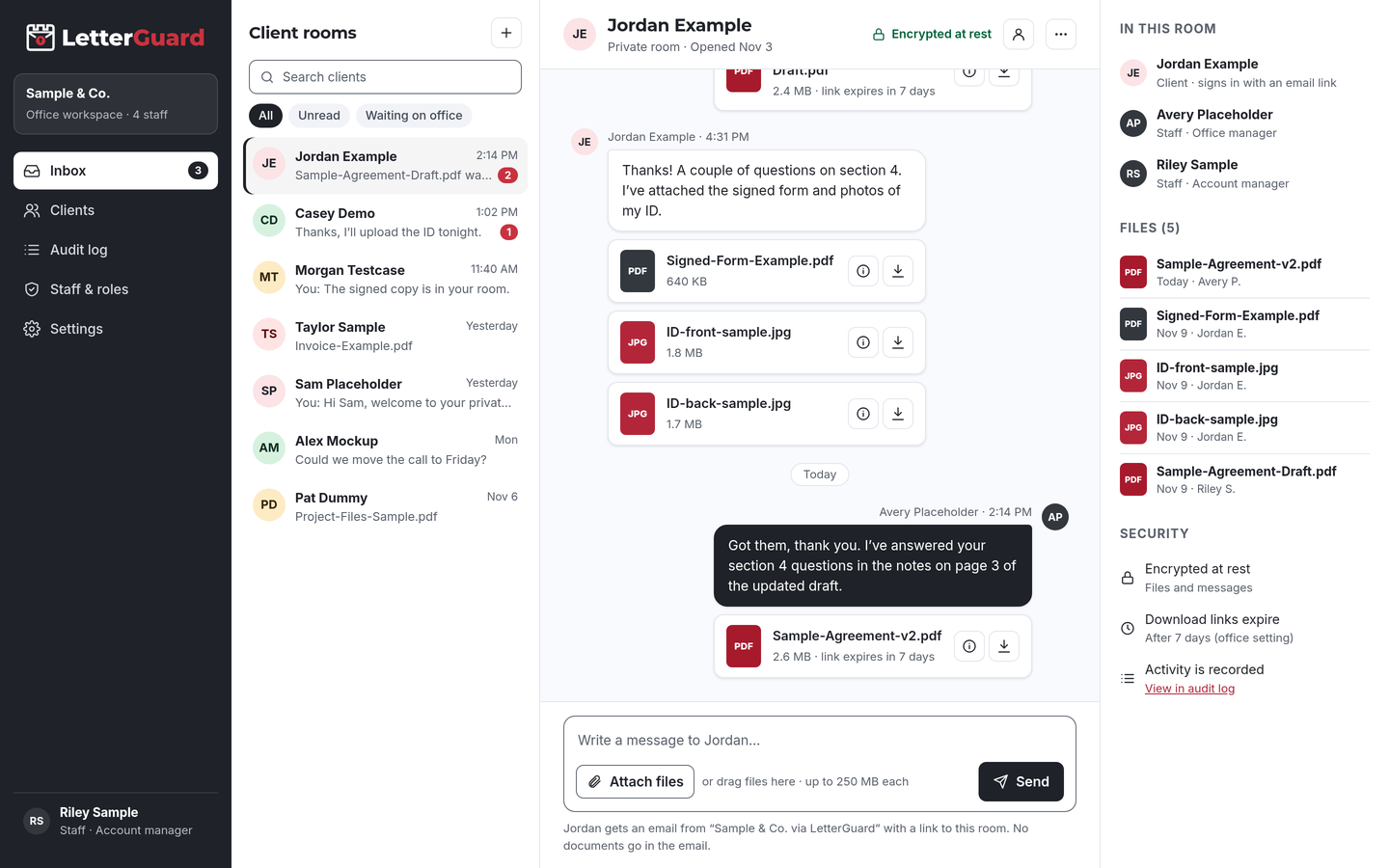
The LetterGuard client room: a list of client rooms, a conversation between office staff and a client with PDF and image attachments, and the room’s members, files and security settings.

The problem

A loan file shouldn’t be assembled from forwarded emails

Every loan needs the same stack of personal financial documents, and most of it still arrives the hard way.

  • Documents arrive everywhere

    Bank statements come by email, pay stubs as phone photos by text, the gift letter through a link. Your processor rebuilds the file by hand, and nobody is sure which statement is the latest.

  • Conditions stall the file

    Underwriting asks for one more statement or a letter of explanation, and the request bounces between loan officer, processor and borrower. Every lost day pushes the closing date.

  • Borrowers send their whole financial life

    Social Security numbers, account numbers and tax returns go out as attachments, sometimes from a shared family email. Copies sit in every inbox the message touched.

  • Closing money attracts fraud

    Scammers watch email threads and send fake payment instructions at the worst moment. Business email compromise accounted for $2.77 billion in reported losses in 2024.Source: FBI IC3, 2024 Internet Crime Report

How it fits your week

From application to closing, step by step

Keep your loan origination system and pricing tools. LetterGuard takes over the part where documents and messages go back and forth with the borrower.

Application and initial documents

  1. After the application, invite the borrower (and co-borrower) to their own room. Starting a batch of pre-approvals? Invite them in bulk.
  2. The borrower gets an email from your office, signs in with a one-time code and uploads pay stubs, W-2s, statements and ID from a phone.
  3. Your team sees each upload in one inbox for every borrower room, and replies in the same thread.

The outcome

A complete starting file in one place, with nothing sitting in personal inboxes or text threads.

Clearing underwriting conditions

  1. Post the condition list in the borrower’s room: the missing statement page, the large-deposit explanation, the updated pay stub.
  2. The borrower uploads each item as they find it. Executable and macro files are blocked, and Professional plans scan every upload for malware.
  3. Send a letter of explanation or disclosure acknowledgment for signature in the room. The signed copy stays with the file.

The outcome

Every condition, answer and signed document in one thread, with a record of when each one arrived.

Getting ready to close

  1. Share the documents the borrower needs to review. They preview them in the browser without downloading a copy.
  2. Questions about cash to close or timing stay in the room instead of a reply-all chain with five parties.
  3. Post closing and payment details in the room, not in email, and tell borrowers to confirm any payment instructions by calling a number they already know.

The outcome

Borrowers know what’s coming, money details stay out of the inbox scammers watch, and your team isn’t repeating answers.

After funding

  1. Export your data to keep with your loan records.
  2. Download links have already expired, so statements you shared aren’t still reachable from old emails.
  3. The access record shows who uploaded or downloaded each file, and when, for your plan’s retention period.

The outcome

A clean file and dead links, plus a record you can point to if anyone asks how documents were handled.

By loan type

The documents each loan really needs

Every borrower room works the same way. What changes is the stack of paperwork you collect.

  • Purchase loans

    Pay stubs, W-2s, bank statements, purchase contract, gift letters

    Collect income and asset documents early, then keep contract updates and conditions in the same room through closing.

  • Refinances

    Mortgage statements, payoff information, insurance declarations, income documents

    Gather current-loan details and income documents without asking the borrower to email account numbers.

  • Self-employed borrowers

    Two years of tax returns, business returns, profit and loss statements, business bank statements

    Long document lists stay visible in one thread, so missing schedules get spotted before underwriting asks.

  • First-time buyers

    IDs, pay stubs, rent history, gift letters, homebuyer education certificates

    A link and a one-time code are easy for first-time borrowers, with nothing to install and no password to forget.

  • Government-backed loans

    Eligibility documents, IDs, income and asset documents

    Keep program-specific paperwork together, with a record of who uploaded each item, and when.

  • Jumbo and non-QM

    Asset statements, investment account statements, explanations of income

    Larger asset packages arrive in one room instead of scattered across several emails and links.

  • Co-borrowers

    Separate income, asset and ID documents for each borrower

    Invite both borrowers to the same room, so each uploads their own documents and sees the same conversation.

  • A different kind of loan?

    If your team collects documents from borrowers, a room works the same way. We’ll walk through your process in a demo.

    Book a demo
Works with how you work

Keep your loan software. Add a room for each borrower.

There’s nothing to migrate and nothing to connect. LetterGuard works alongside the tools your team already uses.

  • Loan origination system

    Applications, pricing, disclosures and the loan file stay where they are. Final documents go into the file as they do today.

  • Your email

    Keep using email for everyday mail. Borrowers get an email notice when there’s something new, and the notice never contains the message or the file.

  • Phone and text

    Keep the calls borrowers expect. The documents and written answers go to the room, so they don’t get lost in a text thread.

Protecting borrower information

Reasonable steps you can point to

Mortgage brokers and lenders are named as financial institutions under the FTC’s Safeguards Rule, which calls for a written information security program, encryption of customer information and multi-factor authentication for people who access it.

LetterGuard gives your team practical protections to use for borrower documents, and a record of how files were shared, which you can describe in your own program.

LetterGuard doesn’t make your office compliant with the Safeguards Rule or any other law, and nothing here is legal advice. Your obligations depend on your licenses, your state and your business.

  • Files and messages encrypted at rest
  • Borrowers sign in with a one-time email code
  • Two-factor login for staff
  • Role-based staff access
  • Download-only files with links that expire
  • A record of who downloaded each file, and when
  • An audit log of account activity
  • Executable and macro files blocked

Compare

Email, text messages or a borrower room

QuestionEmail attachmentsTexted photosLetterGuard
Where the loan conversation livesSpread across each person’s inboxOn whoever’s phone got the textOne room per borrower, messages and files together
Who can open a documentAnyone the email reaches or is forwarded toAnyone with the phoneRoom members who sign in with a code
Old copiesCopies stay in every inboxPhotos stay in camera rollsDownload links expire on their own
Who downloaded whatNo recordNo recordRecorded on every file, with the time
Letters of explanationPrint, sign, scan, sendA photo of a signed pageSigned in the room, with the copy kept there
Risky file typesDepends on your filtersNot checkedExecutables and macro files blocked
What the borrower needsAn inboxA phoneAn email address and a one-time code

Questions mortgage teams ask

What’s the safest way to collect bank statements and pay stubs from borrowers?

Ask borrowers to upload them to a place only they and your team can reach after signing in, instead of emailing or texting them. In LetterGuard, documents go into the borrower’s room, encrypted at rest, and you can see who downloaded each file, and when.

Do mortgage brokers have to protect borrower data under the FTC Safeguards Rule?

The Safeguards Rule names mortgage brokers and lenders as financial institutions and calls for a written security program, encryption and multi-factor authentication. LetterGuard gives you tools to support that program, but it doesn’t make you compliant. Check your obligations with your compliance advisor.

Does LetterGuard replace my loan origination system?

No. Keep your loan origination system for applications, pricing and disclosures. LetterGuard works alongside the tools you already use, with nothing to migrate. It’s the private room where your team and the borrower talk and trade documents.

Can borrowers sign letters of explanation in LetterGuard?

Yes. Send the letter for signature in the borrower’s room. The borrower signs from a computer or phone, and the signed copy and its record stay in the room next to the conversation about it.

How do borrowers log in without a password?

They enter their email address and type in the one-time code LetterGuard sends them. There’s nothing to install and no password to forget. Your staff sign in with two-factor login.

How should borrowers get wire or payment instructions?

Don’t send them by plain email. Post closing and payment details in the borrower’s room and tell borrowers to confirm any instructions by calling a phone number they already know. Payment instructions rarely change at the last minute, so treat any change as a reason to call.

Pricing

Per office, not per seat.

Unlimited staff on every plan, and clients never pay. Plans start at $99/mo.

See plans and pricing

Close loans without chasing paperwork

Bring one real loan file to a short demo. We’ll show you how documents, conditions and signatures would run in a LetterGuard room for your team.

Book a demo