For independent insurance agencies

Quote, bind and renew without the email chase.

LetterGuard gives every client a private room for messages, documents and signatures. Applications and driver’s licenses come in complete, policy documents go out to one place, and renewals stop depending on whoever kept the last email.

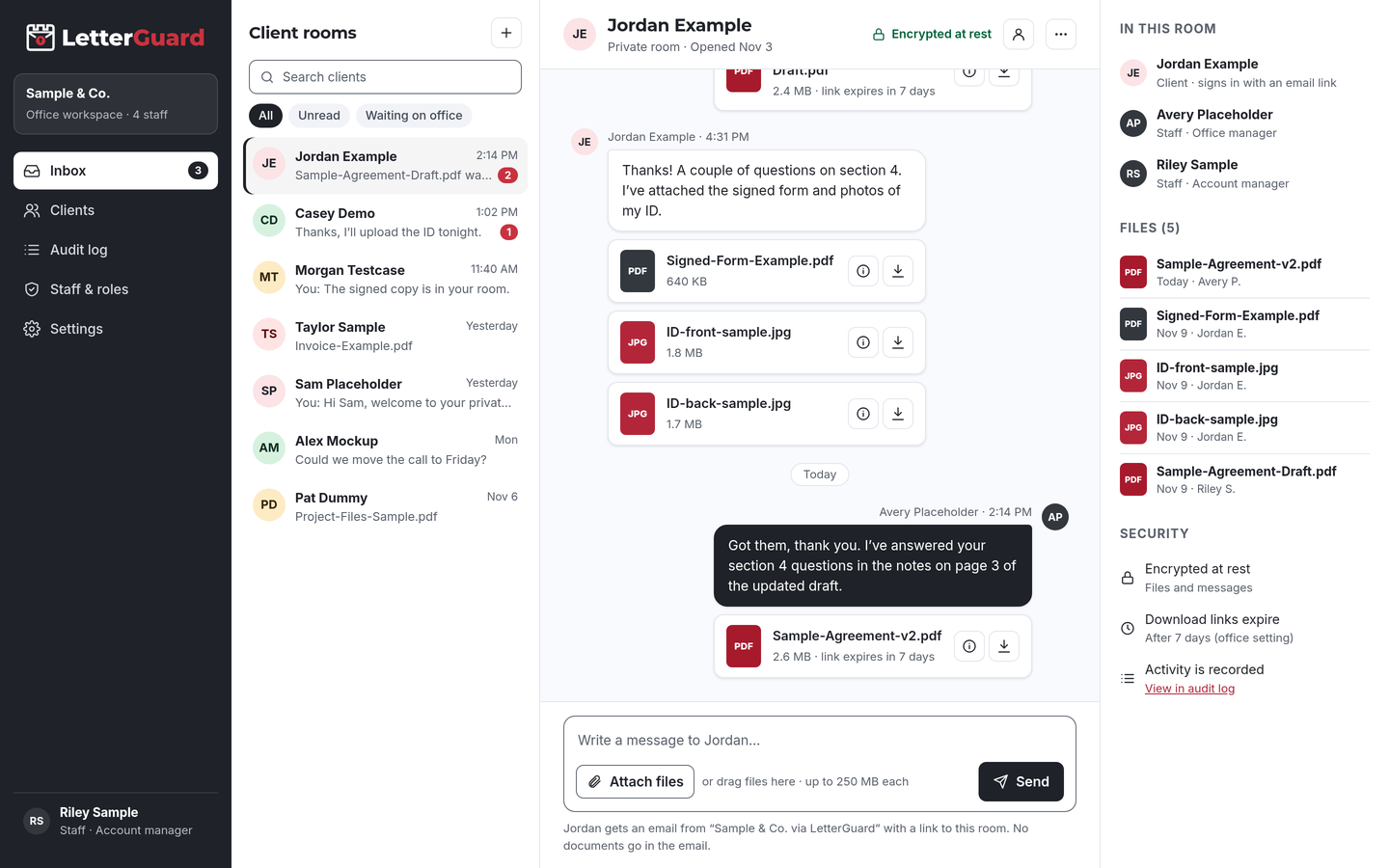
The LetterGuard client room: a list of client rooms, a conversation between office staff and a client with PDF and image attachments, and the room’s members, files and security settings.

The problem

Client data shouldn’t live in your agency’s inboxes

Every quote and renewal needs personal and business details, and most of them still arrive by email. Each renewal starts the chase again.

  • Applications arrive in pieces

    A driver’s license by text, vehicle details by email, the prior declarations page as a photo. Your account manager rebuilds the submission before the carrier will even quote.

  • Renewals become a chase

    Updated payroll, revenue and loss runs for commercial renewals come in late, and your team spends the month before the deadline following up.

  • Personal data piles up

    Dates of birth, license numbers and business financials sit in sent folders and client inboxes long after the policy is bound.

  • Payments attract impersonators

    Fraudsters pose as agencies or clients by email to redirect premium and claim payments. Business email compromise caused $2.77 billion in reported losses in 2024.Source: FBI IC3, 2024 Internet Crime Report

How it fits your week

From quote to renewal

Keep your agency management system, carrier portals and raters. LetterGuard handles the documents and conversation with each client. Producers and account managers work from one inbox for every client room.

New business and quoting

  1. Invite the prospect to their own room. Running a renewal campaign? Invite clients in bulk.
  2. They get an email from your agency, sign in with a one-time code and upload driver’s licenses, prior declarations pages and property details from a phone.
  3. Ask for anything missing in the room’s conversation, where the whole request history stays together.

The outcome

Complete submissions faster, without personal data sitting in email.

Binding and policy delivery

  1. Send applications and acknowledgments for signature in the room. Signed copies stay with the client’s files.
  2. Share policy documents and ID cards. Clients preview them in the browser without downloading a copy.
  3. Answer coverage questions in the same thread, so the explanation stays next to the document.

The outcome

Clients have their policy documents in one place, and your agency has a record of what was delivered and when.

Commercial renewals

  1. Post the renewal checklist in the room: payroll, revenue, vehicle schedules, loss runs.
  2. The client uploads each item as it’s ready. Executable and macro files are blocked, and Professional plans scan every upload for malware.
  3. New uploads show up in your team’s single inbox for every client room.

The outcome

Renewal information arrives in one place, with a clear view of what’s still missing.

Claims support and service

  1. Collect photos, estimates and reports from the client in their room when a claim comes in.
  2. For any change to payment details, confirm by calling a number already on file.
  3. Export your data to keep with your records. Download links expire on their own.

The outcome

Claim documents in one thread, and fewer sensitive files sitting in old emails.

By line of business

The documents each line really needs

Every client room works the same way. What changes is the paperwork. Invite a business owner’s bookkeeper or a spouse to the same room when they need to see the same documents.

  • Personal auto

    Driver’s licenses, vehicle information, prior declarations pages

    Collect household driver and vehicle details in one room instead of a string of texts.

  • Homeowners and renters

    Property details, prior policies, inspection photos, mortgagee information

    Gather property information and photos privately, with a record of who downloaded each file.

  • Commercial lines

    Applications, loss runs, payroll and revenue figures, schedules

    Owners and their bookkeepers upload renewal information to the same room.

  • Workers’ compensation

    Payroll reports, class code details, audit documents

    Keep payroll and audit paperwork out of email and together for each renewal.

  • Life insurance

    Applications, beneficiary designations, IDs

    Collect application documents and beneficiary forms privately, and send forms for signature in the room.

  • Certificates and contracts

    Certificate requests, contracts, additional insured requirements

    Keep contract requirements and certificate requests in the client’s thread.

  • Claims support

    Photos, repair estimates, police reports, correspondence

    Give clients one place to send claim documents when they need help most.

  • Another line of business?

    If your agency trades sensitive documents with clients, a room works the same way. We’ll walk through it in a demo.

    Book a demo

Works with how you work

Keep your agency system. Add a room for each client.

There’s nothing to migrate and nothing to connect. LetterGuard works alongside the tools your agency already uses.

  • Agency management and raters

    Client records, carrier submissions and policies stay where they are. Final documents go into the client file as they do today.

  • Your email

    Keep email for everyday mail. Clients get an email notice when there’s something new, and the notice never contains the message or the file.

  • Phone and service calls

    Keep the calls your clients expect. The documents and written follow-up go to the room, where they won’t get lost.

Protecting client information

Reasonable steps you can point to

Many states have adopted versions of the NAIC Insurance Data Security Model Law, which asks licensees to keep a risk-based information security program, investigate cybersecurity events and notify regulators. Requirements and exemptions, including for small agencies, vary by state.

LetterGuard gives your agency practical protections to use for client documents, and a record of how files were shared, which you can describe in your own program.

LetterGuard doesn’t make your agency compliant with any state insurance law, regulation or carrier requirement, and nothing here is legal advice. Check your state’s rules.

  • Files and messages encrypted at rest
  • Clients sign in with a one-time email code
  • Two-factor login for staff
  • Role-based staff access
  • Download-only files with links that expire
  • A record of who downloaded each file, and when
  • An audit log of account activity
  • Executable and macro files blocked

Compare

Email attachments, share links or a client room

QuestionEmail attachmentsShared drive linksLetterGuard
Where the client conversation livesSpread across each person’s inboxEmail, with files somewhere elseOne room per client, messages and files together
Who can open an applicationAnyone the email reaches or is forwarded toDepends on how the link was sharedRoom members who sign in with a code
Old copiesCopies stay in every inboxLinks work until someone turns them offDownload links expire on their own
Who downloaded whatNo recordVaries by service and settingsRecorded on every file, with the time
Signed formsPrint, sign, scan, sendA separate toolSigned in the room, with the copy kept there
Risky file typesDepends on your filtersDepends on the serviceExecutables and macro files blocked
What the client needsAn inboxOften an account with the serviceAn email address and a one-time code

Questions insurance agencies ask

What’s the safest way to collect driver’s licenses and applications from clients?

Have clients upload them to a place only they and your agency can reach after signing in, instead of emailing or texting them. In LetterGuard, documents go into the client’s room, encrypted at rest, and you can see who downloaded each file, and when.

Do insurance agencies need an information security program?

In states that adopted the NAIC Insurance Data Security Model Law, licensees generally need a risk-based information security program, with exemptions that vary by state and agency size. LetterGuard can support your safeguards, but check your state’s requirements.

Does LetterGuard replace my agency management system?

No. Keep your agency management system, carrier portals and raters. LetterGuard works alongside the tools you already use, with nothing to migrate.

Can clients sign applications in LetterGuard?

Clients can sign documents you send for signature in their room, from a computer or phone, and the signed copy stays in the room. Follow each carrier’s requirements for its own forms.

How do clients log in without a password?

They enter their email address and type in the one-time code LetterGuard sends them. There’s nothing to install and no password to forget. Your staff sign in with two-factor login.

Can we use LetterGuard for commercial renewals?

Yes. Post the renewal checklist in the client’s room, and the owner or their bookkeeper uploads payroll, revenue and schedules there. Your team sees each upload in one inbox, and download links expire on their own once the renewal is done.

Pricing

Per office, not per seat.

Unlimited staff on every plan, and clients never pay. Plans start at $99/mo.

See plans and pricing

Spend renewal season selling, not chasing

Bring one real client file to a short demo. We’ll show you how applications, policy delivery and renewals would run in LetterGuard rooms for your agency.

Book a demo