For independent advisors and planning firms

Planning documents in, account data out of email.

LetterGuard gives every household a private room for messages, documents and signatures. Statements and tax returns arrive in one place, plans get reviewed where the conversation happens, and account numbers stop riding along in email threads.

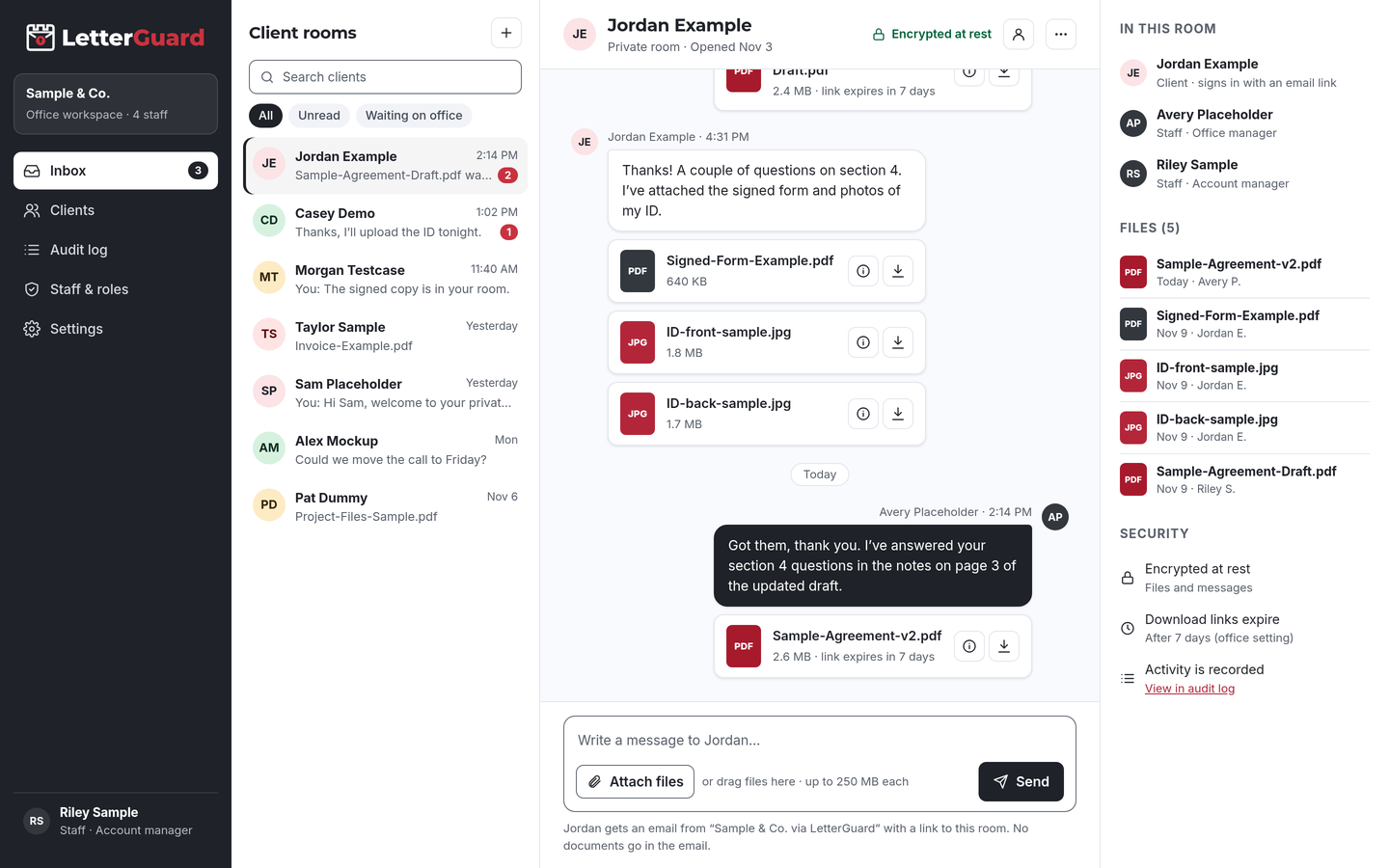
The LetterGuard client room: a list of client rooms, a conversation between office staff and a client with PDF and image attachments, and the room’s members, files and security settings.

The problem

A financial plan is only as private as your inbox

Good advice starts with a full picture of a client’s finances, and most of that picture still arrives by email.

  • Statements scatter

    Brokerage statements by email, a 401(k) summary as a screenshot, last year’s tax return through a link. Your team assembles the household picture by hand before every review.

  • Onboarding drags

    New-client paperwork stalls on one missing statement or trust document, and your associate spends days following up instead of planning.

  • Account numbers everywhere

    Statements and transfer paperwork carry account numbers, dates of birth and Social Security numbers. Copies sit in every inbox that touched them.

  • Money movement attracts impersonators

    Fraudsters pose as clients or advisors by email to redirect funds. Business email compromise accounted for $2.77 billion in reported losses in 2024.Source: FBI IC3, 2024 Internet Crime Report

How it fits your week

From onboarding to annual review

Keep your CRM, planning software and custodian tools. LetterGuard handles the documents and conversation with each household.

Onboarding a new household

  1. Invite the clients to a shared household room. Moving a book of clients over? Invite them in bulk.
  2. They get an email from your firm, sign in with a one-time code and upload statements, tax returns, estate documents and IDs from a phone.
  3. Send the advisory agreement for signature in the room. The signed copy stays there.

The outcome

A complete starting picture and a signed agreement, without account statements sitting in anyone’s inbox.

Building and presenting the plan

  1. Ask for missing pieces in the room’s conversation: the pension statement, the insurance policy, the updated budget.
  2. Share the draft plan. Clients preview it in the browser without downloading a copy, and ask questions in the same thread.
  3. Share the final plan and meeting notes, with a record of when each was downloaded.

The outcome

Clients review the plan before the meeting, and the conversation about it stays with the document.

Ongoing service and money movement

  1. Collect beneficiary updates, transfer paperwork support documents and tax forms as life changes.
  2. For any request to move money or change instructions, confirm by calling a number already on file, even if the request came through the room.
  3. Executable and macro files are blocked, and Professional plans scan every upload for malware.

The outcome

Service requests and documents in one place, with your verification steps still in place.

Annual review and records

  1. Use the same room every year for updated statements and the review packet.
  2. Download links expire on their own, so last year’s documents aren’t reachable from old emails.
  3. Export your data to keep with your records and your firm’s archiving process.

The outcome

A clear history of what was shared with each household, and when.

By practice focus

The documents your clients actually share

Every household room works the same way. What changes is the paperwork behind the plan.

  • Comprehensive planning

    Brokerage and bank statements, tax returns, insurance policies, budgets

    Gather the whole financial picture in one room before the first planning meeting.

  • Retirement planning

    Retirement plan statements, pension estimates, Social Security statements

    Keep retirement income documents together and up to date for each review.

  • Estate coordination

    Wills, trusts, beneficiary designations, powers of attorney

    Collect copies of estate documents privately, and share summaries with the clients who need them.

  • Business owners

    Business returns, financial statements, buy-sell agreements, retirement plan documents

    Owners and their accountants can upload to the same room when you invite them.

  • Tax-aware planning

    Tax returns, cost-basis reports, charitable giving records

    Coordinate tax documents with clients without emailing full returns back and forth.

  • Divorce and life transitions

    Account statements, settlement documents, updated beneficiary forms

    Give each client their own private room when a household splits, so documents stay separate.

  • Insurance and risk reviews

    Life, disability and long-term care policies, declarations pages

    Collect policies for review in one place, with a record of who downloaded each file.

  • Different kind of practice?

    If your firm collects sensitive financial documents from clients, a room works the same way. We’ll walk through it in a demo.

    Book a demo
Works with how you work

Keep your advisor tools. Add a room for each household.

There’s nothing to migrate and nothing to connect. LetterGuard works alongside the tools your firm already uses.

  • CRM and planning software

    Client records, planning models and tasks stay where they are. Final documents go into your files as they do today.

  • Custodian and account tools

    Account opening, trading and custodial forms stay with your custodian. LetterGuard is for the documents and conversation around them.

  • Your email and archiving

    Keep email for everyday mail. Clients get a notice with no message or file in it, and you can export room data for your records.

Protecting client information

Reasonable steps you can point to

The SEC’s amended Regulation S-P requires covered firms, including registered investment advisers, to have an incident response program and to notify affected individuals within 30 days when sensitive customer information is accessed without authorization. Advisors who aren’t SEC-registered may fall under the FTC Safeguards Rule.

LetterGuard gives your firm practical protections to use for client documents, and a record of how files were shared, which you can describe in your own policies.

LetterGuard doesn’t make your firm compliant with Regulation S-P, the Safeguards Rule, recordkeeping rules or any other requirement, and nothing here is legal or compliance advice. Confirm retention and supervision obligations with your compliance team.

  • Files and messages encrypted at rest
  • Clients sign in with a one-time email code
  • Two-factor login for staff
  • Role-based staff access
  • Download-only files with links that expire
  • A record of who downloaded each file, and when
  • An audit log of account activity
  • Export your data anytime

Compare

Email attachments, share links or a household room

QuestionEmail attachmentsShared drive linksLetterGuard
Where the client conversation livesSpread across each person’s inboxEmail, with files somewhere elseOne room per household, messages and files together
Who can open a statementAnyone the email reaches or is forwarded toDepends on how the link was sharedRoom members who sign in with a code
Old copiesCopies stay in every inboxLinks work until someone turns them offDownload links expire on their own
Who downloaded whatNo recordVaries by service and settingsRecorded on every file, with the time
Advisory agreementsPrint, sign, scan, sendA separate toolSigned in the room, with the copy kept there
Getting your data outScattered across mailboxesDepends on the serviceExport your data anytime
What the client needsAn inboxOften an account with the serviceAn email address and a one-time code

Questions financial advisors ask

What’s the safest way for clients to send statements to their financial advisor?

Upload them to a place only the client and your firm can reach after signing in, rather than emailing them. In LetterGuard, documents go into the household’s room, encrypted at rest, and you can see who downloaded each file, and when.

What does the amended Regulation S-P mean for small advisory firms?

Covered firms need written incident response procedures and must notify affected individuals within 30 days of an unauthorized access to sensitive customer information. Smaller entities had until June 3, 2026 to comply. LetterGuard can support your safeguards, but your compliance team decides what the rule requires of you.

Does LetterGuard replace my CRM or custodian portal?

No. Keep your CRM, planning software and custodian tools. LetterGuard works alongside the tools you already use, with nothing to migrate. It’s the private room for documents and conversation with each household.

Do LetterGuard messages need to be archived?

Client communications may be subject to your recordkeeping and supervision rules. LetterGuard lets you export your data for your records, but it isn’t an archiving system. Confirm with your compliance team how room messages fit your archiving process.

Can clients sign advisory agreements in LetterGuard?

Yes. Send the agreement for signature in the household’s room. Clients sign from a computer or phone, and the signed copy and its record stay in the room. Custodial account forms stay with your custodian’s process.

How do clients log in without a password?

They enter their email address and type in the one-time code LetterGuard sends them. There’s nothing to install and no password to forget. Your staff sign in with two-factor login.

Pricing

Per office, not per seat.

Unlimited staff on every plan, and clients never pay. Plans start at $99/mo.

See plans and pricing

Give every household a private place to plan

Bring one real client household to a short demo. We’ll show you how onboarding, plan reviews and signatures would run in LetterGuard rooms for your firm.

Book a demo