For CPA, tax and bookkeeping firms

Tax season without the inbox scramble.

LetterGuard gives every client a private room for messages, documents and signatures. W-2s, 1099s and K-1s land in one place, engagement letters get signed before work starts, and finished returns go back without a single attachment.

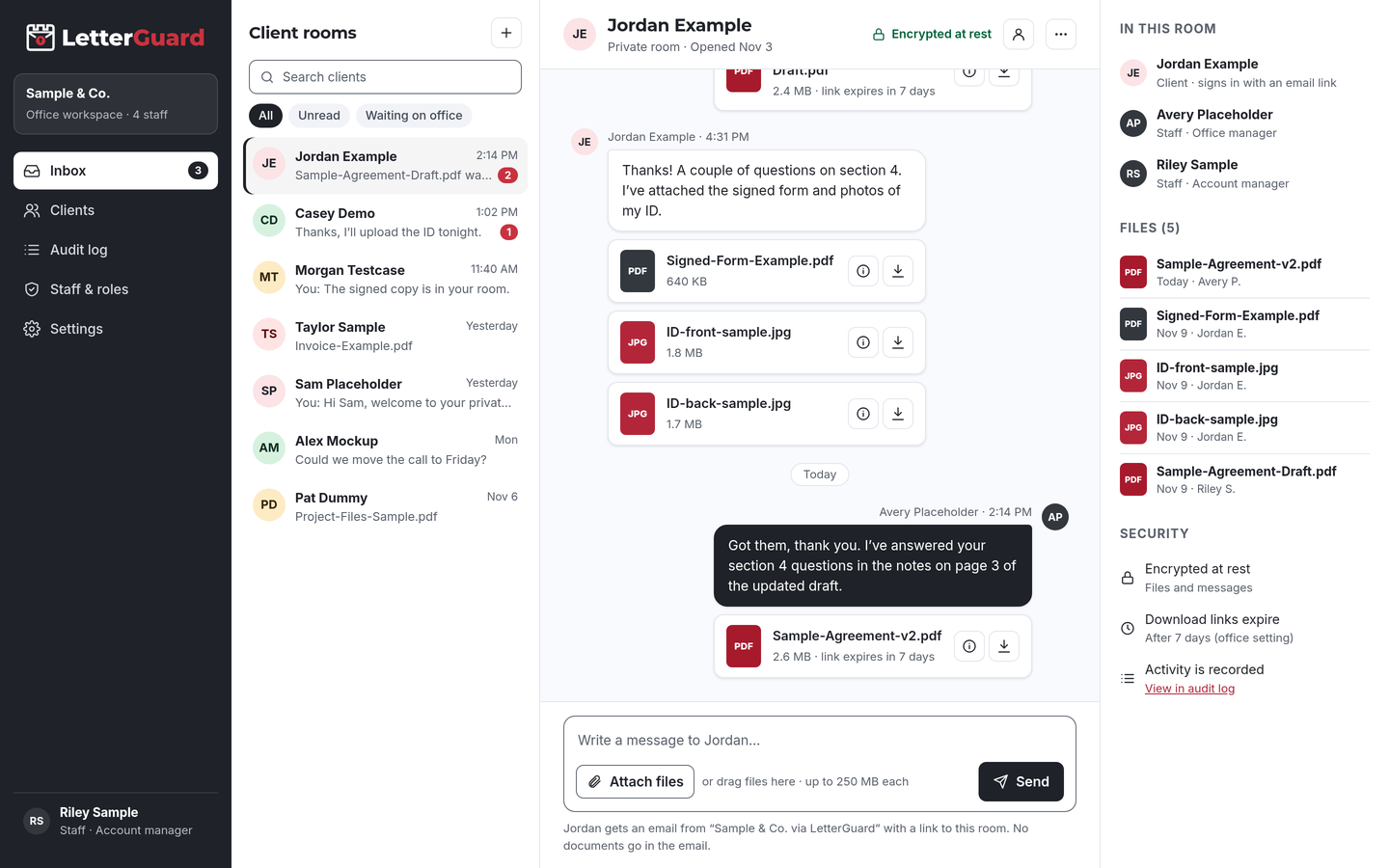
The LetterGuard client room: a list of client rooms, a conversation between office staff and a client with PDF and image attachments, and the room’s members, files and security settings.

The problem

Taxpayer data shouldn’t travel as attachments

Every return needs the same personal financial documents, and every year they arrive the same messy way.

  • Documents trickle in from everywhere

    One W-2 by email, a 1099 as a phone photo, a K-1 weeks later through a link. Your staff rebuild each client’s file by hand and still miss the brokerage statement.

  • Staff chase clients all season

    Reminder emails, voicemails and “I already sent it” replies eat the hours you need for preparation and review, right when deadlines are closest.

  • Returns carry everything a thief wants

    Social Security numbers, bank accounts and income details sit in sent folders and client inboxes, sometimes a shared family account, long after filing.

  • Phishing targets tax professionals

    The IRS warns that data thefts at tax professionals’ offices are on the rise and that scammers impersonate the IRS, tax software and cloud storage providers by email.Source: IRS Publication 4557

How it fits your week

From engagement letter to filed return

Keep your tax and accounting software. LetterGuard handles the documents and conversation with each client.

Engagement and organizer

  1. At the start of the season, invite your clients in bulk. Each one gets their own room.
  2. Clients get an email from your firm, sign in with a one-time code, and find the engagement letter waiting for signature.
  3. Share your organizer or document checklist in the room, where the client can return to it anytime.

The outcome

Signed engagement letters before work starts, and every client knows exactly where to send documents.

Collecting tax documents

  1. Clients upload W-2s, 1099s, K-1s and statements from a phone or computer as they arrive.
  2. Executable and macro files are blocked, and Professional plans scan every upload for malware.
  3. New uploads show up in your team’s single inbox for every client room. Ask about anything missing in the same thread.

The outcome

One place to see what’s in and what’s still missing for every client, with a record of when each document arrived.

Review and delivery

  1. Share the draft return for review. The client previews it in the browser without downloading a copy.
  2. Questions and answers stay in the conversation next to the return, not in a forwarded email.
  3. Share the final return and any e-file authorization for the client to complete, following your usual process.

The outcome

Clients review before filing, and finished returns never travel as email attachments.

Bookkeeping and year-round work

  1. Keep the same room for monthly statements, payroll reports and notices from tax agencies.
  2. Download links expire on their own, so last year’s return isn’t reachable from an old email.
  3. Export your data anytime to keep with your records, and check the audit log for account activity.

The outcome

A year-round channel for sensitive documents, without building a new process every season.

By client type

The documents your practice actually trades

Every client room works the same way. What changes is the paperwork.

  • Individual returns

    W-2s, 1099s, 1098s, brokerage statements, prior-year returns

    Collect a full year of forms in one room instead of a dozen emails, then deliver the return back to the same place.

  • Business returns

    Financial statements, trial balances, payroll reports, fixed-asset lists

    Owners and their bookkeepers upload to the same room, so the business file arrives together.

  • Partnerships and K-1s

    K-1s, partnership agreements, capital account statements

    Share K-1s with each partner in their own room, so no partner sees another’s figures.

  • Bookkeeping clients

    Bank and card statements, receipts, invoices, payroll records

    Make the room the standing place for monthly documents instead of a recurring email chase.

  • Tax notices and resolution

    Agency notices, transcripts, payment plans, correspondence

    Collect notices quickly and keep the whole resolution conversation in one thread.

  • Trusts and estates

    Trust documents, fiduciary statements, beneficiary information

    Keep sensitive family and fiduciary records private, with a record of who downloaded each file.

  • Payroll services

    New-hire forms, W-4s, I-9 support documents, payroll registers

    Collect employee documents from client businesses without them sitting in your inbox.

  • Another kind of engagement?

    If your firm trades sensitive documents with clients, a room works the same way. We’ll walk through it in a demo.

    Book a demo
Works with how you work

Keep your tax software. Add a room for each client.

There’s nothing to migrate and nothing to connect. LetterGuard works alongside the tools your firm already uses.

  • Tax and accounting software

    Preparation, e-filing, workpapers and billing stay where they are. Final documents go into your files as they do today.

  • Your email

    Keep email for everyday mail. Clients get an email notice when there’s something new, and the notice never contains the message or the file.

  • Phone and meetings

    Keep the calls and meetings clients expect at tax time. The documents and written follow-up go to the room, where they won’t get lost.

Protecting taxpayer data

Reasonable steps you can point to

Under the Gramm-Leach-Bliley Act and the FTC Safeguards Rule, tax and accounting professionals must keep a written information security plan, regardless of size. IRS Publication 5708 explains what that plan should cover, including safeguards, service providers and multi-factor authentication.

LetterGuard gives your firm practical protections to use for client documents, and a record of how files were shared, which you can describe in your plan.

LetterGuard doesn’t make your firm compliant with the Safeguards Rule, IRS requirements or professional standards, and nothing here is legal or tax advice. Your obligations depend on your practice.

  • Files and messages encrypted at rest
  • Clients sign in with a one-time email code
  • Two-factor login for staff
  • Role-based staff access
  • Download-only files with links that expire
  • A record of who downloaded each file, and when
  • An audit log of account activity
  • Executable and macro files blocked

Compare

Email attachments, share links or a client room

QuestionEmail attachmentsShared drive linksLetterGuard
Where the client conversation livesSpread across each person’s inboxEmail, with files somewhere elseOne room per client, messages and files together
Who can open a returnAnyone the email reaches or is forwarded toDepends on how the link was sharedRoom members who sign in with a code
Last year’s documentsCopies stay in every inboxLinks work until someone turns them offDownload links expire on their own
Who downloaded whatNo recordVaries by service and settingsRecorded on every file, with the time
Engagement lettersPrint, sign, scan, sendA separate toolSigned in the room, with the copy kept there
Risky file typesDepends on your filtersDepends on the serviceExecutables and macro files blocked
What the client needsAn inboxOften an account with the serviceAn email address and a one-time code

Questions accounting and tax firms ask

What’s the safest way for clients to send tax documents to their accountant?

Upload them to a place only the client and your firm can reach after signing in, rather than emailing them. In LetterGuard, documents go into the client’s room, encrypted at rest, and you can see who downloaded each file, and when.

Do tax preparers need a written information security plan?

Yes. The IRS says federal law requires tax and accounting professionals to create and maintain a written information security plan under the FTC Safeguards Rule. LetterGuard can be one of the safeguards you describe in it, but it doesn’t write or satisfy the plan for you.

Does LetterGuard replace my tax software?

No. Keep your tax and accounting software for preparation, e-filing and billing. LetterGuard works alongside the tools you already use, with nothing to migrate.

Can clients sign engagement letters in LetterGuard?

Yes. Send the engagement letter for signature in the client’s room. The client signs from a computer or phone, and the signed copy and its record stay in the room. For e-file authorizations, follow the IRS rules for the method you use.

How do clients log in without a password?

They enter their email address and type in the one-time code LetterGuard sends them. There’s nothing to install and no password to forget. Your staff sign in with two-factor login.

Can we invite all our tax clients at once?

Yes. Invite clients in bulk at the start of the season. Each client gets their own private room and an email from your firm explaining how to sign in.

Pricing

Per office, not per seat.

Unlimited staff on every plan, and clients never pay. Plans start at $99/mo.

See plans and pricing

Spend tax season preparing returns, not chasing documents

Bring one real client file to a short demo. We’ll show you how documents, engagement letters and return delivery would run in LetterGuard rooms for your firm.

Book a demo