For property management companies

Rental applications and owner files, out of your inbox.

LetterGuard gives every applicant, resident and owner a private room for messages, documents and signatures. Pay stubs and IDs stay out of email, leases and management agreements get signed in one place, and owner statements reach the right people.

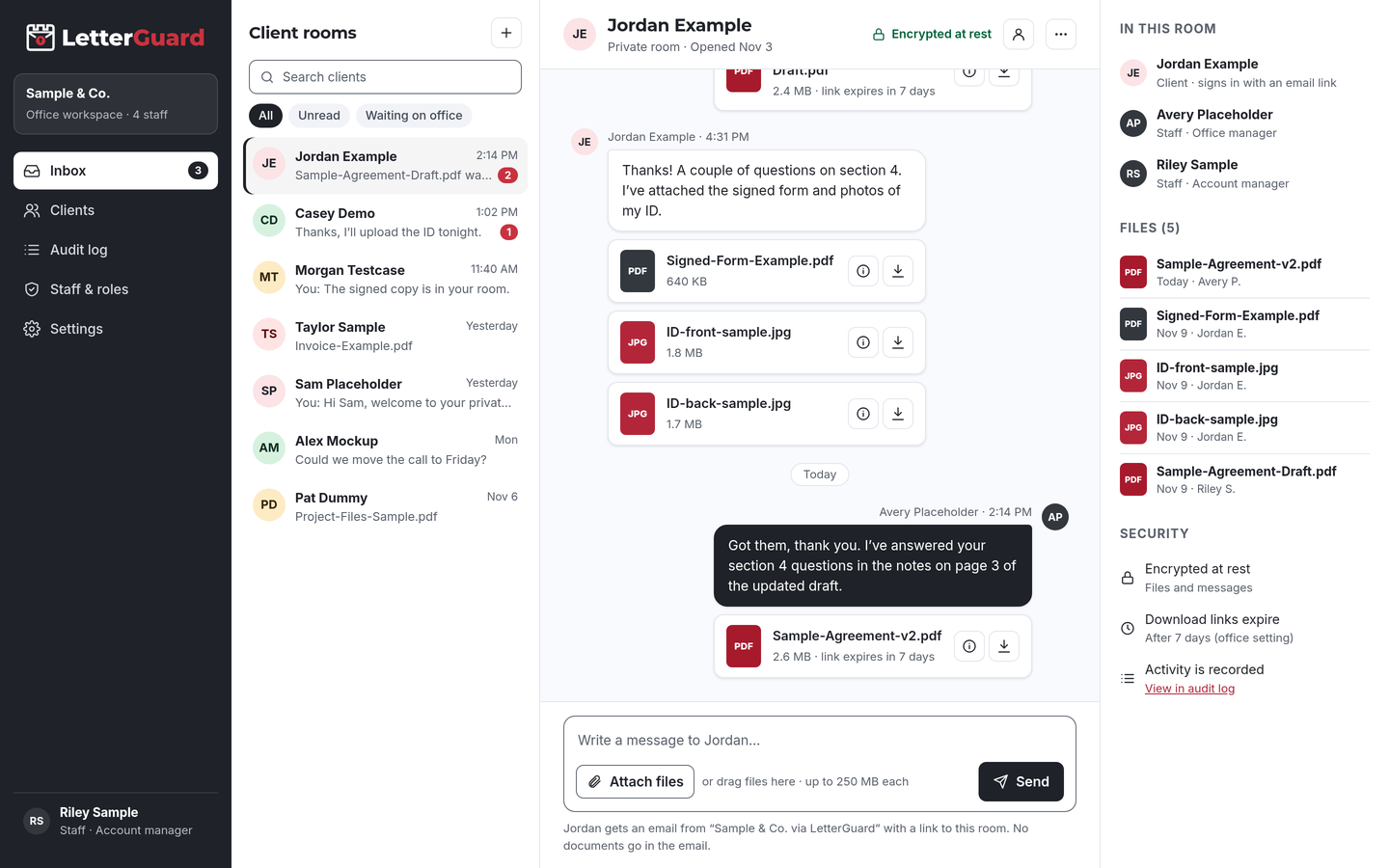
The LetterGuard client room: a list of client rooms, a conversation between office staff and a client with PDF and image attachments, and the room’s members, files and security settings.

The problem

Your inbox is full of other people’s identities

Every lease and every owner relationship runs on sensitive documents, and many still travel by email. Each one is a record your company has to protect.

  • Applications by attachment

    Pay stubs, bank statements and ID photos arrive by email and text from every applicant, and they stay there long after the unit is leased.

  • Leasing waits on paperwork

    A missing pay stub or co-signer form holds up an approval, and your leasing team spends the day following up instead of showing units.

  • Owner files spread out

    Management agreements, W-9s and statements go back and forth with owners across inboxes, and nobody is sure which version is current.

  • Payment details get spoofed

    Fraudsters impersonate owners, vendors and managers by email to redirect payments. Business email compromise caused $2.77 billion in reported losses in 2024.Source: FBI IC3, 2024 Internet Crime Report

How it fits your week

From application to owner statement

Keep your property management and accounting software and resident portal. LetterGuard handles the sensitive documents and conversations around them. Leasing agents, property managers and accounting staff work from one inbox, with role-based access.

Applications

  1. Invite each applicant to their own room, so no applicant sees another’s documents.
  2. They get an email from your company, sign in with a one-time code and upload IDs, pay stubs and bank statements from a phone.
  3. Ask for anything missing in the same thread, and see each upload in one inbox for every room.

The outcome

Complete applications in one place, without applicants’ personal data sitting in staff inboxes.

Lease signing and move-in

  1. Send the lease and addenda for signature in the resident’s room. The signed copies stay there.
  2. Share move-in instructions and inspection forms. Residents preview them in the browser without downloading a copy.
  3. Collect move-in photos and documents in the same room.

The outcome

A signed lease and a complete move-in file, with a record of who downloaded each document.

Onboarding owners

  1. Invite new owners in bulk when you take over a portfolio. Each owner gets their own room.
  2. Send the management agreement for signature, and collect W-9s, insurance certificates and property documents.
  3. Before you change any owner’s payment details, confirm by calling a number already on file.

The outcome

Owner files start complete, and payment changes still get a phone check.

Monthly and year-end reporting

  1. Share owner statements and year-end tax documents in each owner’s room.
  2. Download links expire on their own, so last year’s statements aren’t reachable from old emails.
  3. Export your data to keep with your records, and check the audit log for account activity.

The outcome

Owners always know where their statements are, and your team stops resending the same attachments every month.

By portfolio type

The documents your portfolio really trades

Every room works the same way. What changes is who you’re working with and what they send. Applicants, residents and owners each get their own room, so their documents never mix.

  • Single-family rentals

    Applications, IDs, pay stubs, leases, owner agreements

    Handle applicants and owners in separate rooms, each with only their own documents.

  • Multifamily

    Applications, leases and renewals, notices, move-in inspections

    Give residents one private place for lease documents, separate from everyday maintenance requests.

  • Homeowners associations

    Governing documents, board packets, owner ledgers, violation letters

    Share board materials privately with the people who need them, with a record of who downloaded each file.

  • Condominium associations

    Insurance certificates, budgets, reserve studies, resale documents

    Collect and share association documents without sending them as attachments.

  • Commercial properties

    Lease abstracts, certificates of insurance, tenant financials

    Keep tenant financial documents private and organized by tenant.

  • Short-term and furnished rentals

    Owner agreements, insurance documents, tax forms

    Keep owner paperwork and statements in one room per owner.

  • Portfolio takeovers

    Leases, deposits records, owner files from the prior manager

    Invite owners in bulk and collect transfer documents in one organized place.

  • Different kind of portfolio?

    If your company trades sensitive documents with residents or owners, a room works the same way. We’ll walk through it in a demo.

    Book a demo
Works with how you work

Keep your property software. Add a private room for sensitive files.

There’s nothing to migrate and nothing to connect. LetterGuard works alongside the tools your company already uses, and your team keeps the systems it knows.

  • Property management software

    Listings, screening, rent collection, maintenance and accounting stay where they are. LetterGuard is for the sensitive documents and conversations around them.

  • Your email

    Keep email for everyday mail. Applicants, residents and owners get an email notice when there’s something new, and the notice never contains the message or the file.

  • Phone and payment checks

    Keep calling to verify any change to payment details. The written documents go to the room, where they won’t get lost.

Protecting applicant and owner information

Reasonable steps you can point to

Tenant screening reports are consumer reports under the Fair Credit Reporting Act, and the FTC’s Disposal Rule requires reasonable measures when disposing of that information. Rental applications carry Social Security numbers, IDs and income documents that call for the same care.

LetterGuard gives your company practical protections to use for applicant, resident and owner documents, and a record of how files were shared.

LetterGuard doesn’t make your company compliant with the Fair Credit Reporting Act, fair housing laws or any other law, and nothing here is legal advice. Screening decisions and record retention remain your responsibility.

  • Files and messages encrypted at rest
  • Applicants and owners sign in with a one-time email code
  • Two-factor login for staff
  • Role-based staff access
  • Download-only files with links that expire
  • A record of who downloaded each file, and when
  • An audit log of account activity
  • Executable and macro files blocked

Compare

Email attachments, texts or a private room

QuestionEmail attachmentsTexted photosLetterGuard
Where the conversation livesSpread across each person’s inboxOn whoever’s phone got the textOne room per applicant, resident or owner
Who can open an applicationAnyone the email reaches or is forwarded toAnyone with the phoneRoom members who sign in with a code
Old copiesCopies stay in every inboxPhotos stay in camera rollsDownload links expire on their own
Who downloaded whatNo recordNo recordRecorded on every file, with the time
Leases and agreementsPrint, sign, scan, sendA photo of a signed pageSigned in the room, with the copy kept there
Risky file typesDepends on your filtersNot checkedExecutables and macro files blocked
What the other person needsAn inboxA phoneAn email address and a one-time code

Questions property managers ask

What’s the safest way to collect rental application documents?

Have applicants upload them to a place only they and your team can reach after signing in, instead of emailing or texting them. In LetterGuard, documents go into the applicant’s room, encrypted at rest, and you can see who downloaded each file, and when.

How should landlords handle tenant screening information?

Screening reports are consumer reports under the Fair Credit Reporting Act, with rules on use, adverse action notices and secure disposal. Keep related documents somewhere access is limited and recorded, and follow your legal advisor’s guidance on retention.

Does LetterGuard replace my property management software?

No. Keep your property management software for listings, screening, rent and maintenance. LetterGuard works alongside the tools you already use, with nothing to migrate.

Can residents sign leases in LetterGuard?

Yes. Send the lease for signature in the resident’s room. Residents sign from a computer or phone, and the signed copy and its record stay in the room. Your state’s lease rules still apply.

How do applicants and owners log in without a password?

They enter their email address and type in the one-time code LetterGuard sends them. There’s nothing to install and no password to forget. Your staff sign in with two-factor login.

Can we onboard all our owners at once?

Yes. Invite owners in bulk. Each owner gets their own private room and an email from your company explaining how to sign in. Owners see only their own statements and documents.

Pricing

Per office, not per seat.

Unlimited staff on every plan, and clients never pay. Plans start at $99/mo.

See plans and pricing

Lease faster, without the identity risk in your inbox

Bring one real application or owner file to a short demo. We’ll show you how documents, leases and owner statements would run in LetterGuard rooms for your company.

Book a demo