For real estate agents and brokerages

Keep every deal’s documents in one private room.

LetterGuard gives every buyer and seller a private room for messages, documents and signatures. Pre-approvals and proof of funds stay out of email, disclosures get reviewed where the questions are asked, and your clients always know where to look.

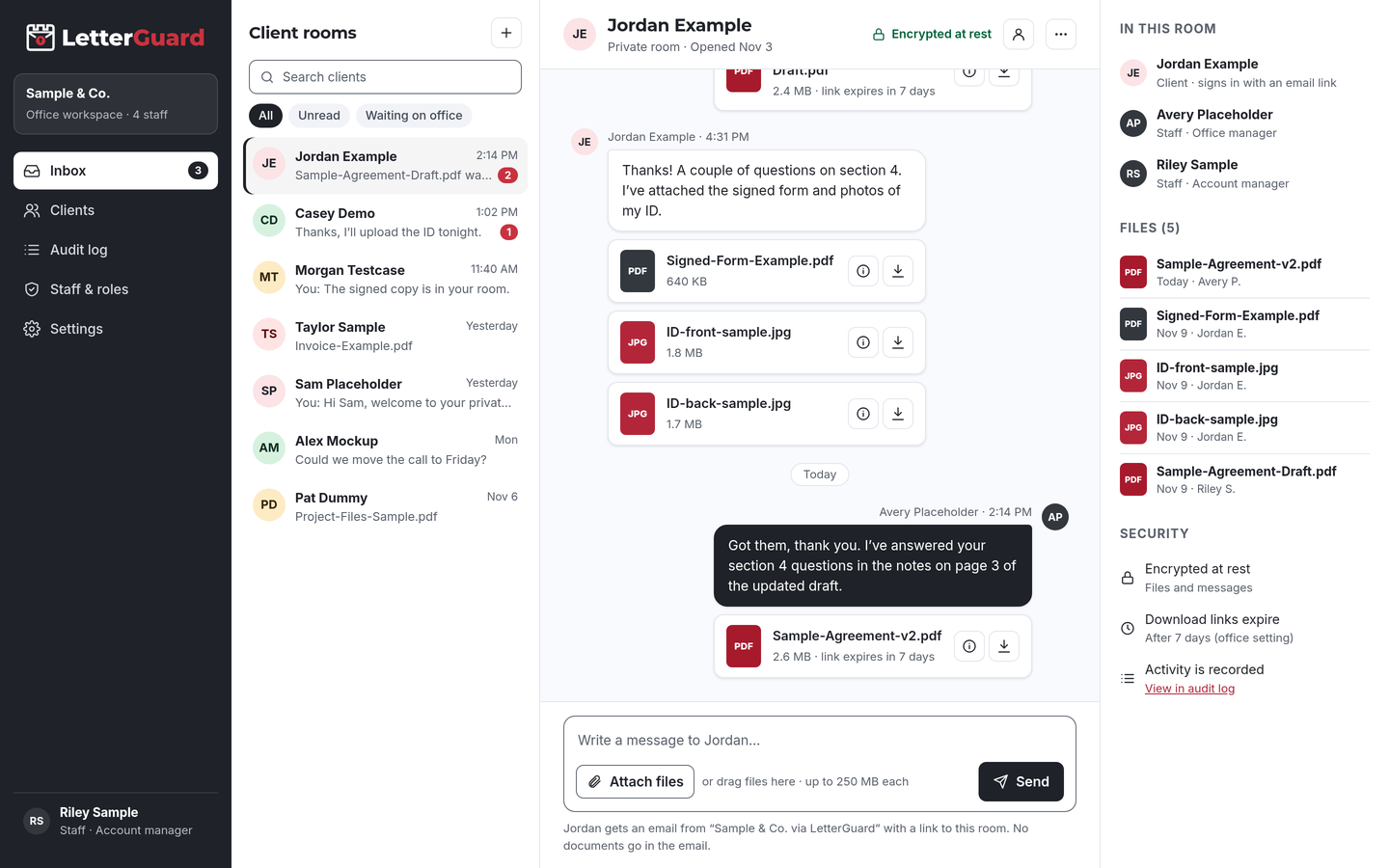
The LetterGuard client room: a list of client rooms, a conversation between office staff and a client with PDF and image attachments, and the room’s members, files and security settings.

The problem

Your clients’ finances shouldn’t live in email threads

A single transaction runs on dozens of documents and messages, and criminals know most of them travel by email.

  • Documents scatter across apps

    The pre-approval came by email, the bank statement as a text photo, the HOA documents through a link. You rebuild the deal file every time someone asks for it.

  • Clients ask the same questions

    Where’s the inspection report? Did the seller sign? Which disclosure is current? Answers get lost in long threads with buyers, sellers and other agents.

  • Proof of funds in plain email

    Bank statements and pre-approval letters carry account numbers and balances, and they sit in every inbox they were forwarded to.

  • Fraudsters watch transactions

    Real estate fraud drew 9,359 complaints and $173.6 million in reported losses in 2024, often through hacked email and fake wiring instructions.Source: FBI IC3, 2024 Internet Crime Report

How it fits your week

From first showing to closing day

Keep your transaction tools, MLS and CRM. LetterGuard handles the private documents and conversation with each client.

Signing on a buyer

  1. Invite the buyer to their own room after your first meeting.
  2. They get an email from you, sign in with a one-time code and upload their pre-approval letter and proof of funds from a phone.
  3. Send the buyer representation agreement for signature in the room. The signed copy stays there.

The outcome

A signed agreement and financial documents in one private place, ready when you write the first offer.

Taking a listing

  1. Invite the seller to a room and send the listing agreement for signature.
  2. Collect disclosures, HOA documents, surveys and payoff details as the seller finds them.
  3. Share marketing drafts and pricing analyses. Sellers preview them in the browser without downloading a copy.

The outcome

A complete listing file before the photos are scheduled, with the seller’s paperwork in one thread.

Under contract

  1. Share inspection reports, repair requests and appraisal updates in the room as they come in.
  2. Answer questions in the same thread, so the client sees the full history of every decision.
  3. Remind clients never to act on emailed wiring instructions and to confirm by calling a number they already know.

The outcome

Fewer “where is that document?” calls, and clients who know how to spot a fake payment request.

After closing

  1. Leave final documents in the room for the client to download, then export your data for your records.
  2. Download links expire on their own, so financial documents aren’t reachable from old emails.
  3. The access record shows who uploaded or downloaded each file, and when, for your plan’s retention period.

The outcome

A clean file, dead links, and a record you can point to if a client asks how their documents were handled.

By client type

The documents each deal really needs

Every client room works the same way. What changes is the paperwork. Invite co-buyers, co-sellers or a client’s attorney to the same room when everyone needs the same documents.

  • Buyers

    Pre-approval letters, proof of funds, IDs, buyer representation agreements

    Keep financial documents private from the first showing through closing.

  • Sellers

    Listing agreements, seller disclosures, HOA documents, payoff details

    Collect the seller’s paperwork in one room and share updates as offers arrive.

  • First-time buyers

    Pre-approvals, gift letters, inspection reports

    Give new buyers one simple place to find every document and ask every question.

  • Relocation clients

    IDs, employment letters, proof of funds, leases

    Clients moving from out of town upload from a phone and follow along remotely.

  • Investors

    Proof of funds, entity documents, leases, rent rolls

    Collect entity and investment documents together, with a record of who downloaded each one.

  • Rentals and leasing

    Rental applications, IDs, income verification, leases

    Keep applicants’ personal documents out of your inbox and send leases for signature in the room.

  • Luxury and private sales

    Proof of funds, non-disclosure agreements, offer documents

    Share sensitive offers and financial documents only with the people who need them.

  • Different kind of deal?

    If your team trades sensitive documents with clients, a room works the same way. We’ll walk through it in a demo.

    Book a demo
Works with how you work

Keep your transaction tools. Add a room for each client.

There’s nothing to migrate and nothing to connect. LetterGuard works alongside the tools your brokerage already uses.

  • Transaction and listing tools

    Contracts, compliance files, the MLS and your CRM stay where they are. LetterGuard is for the client’s private documents and conversation.

  • Your email

    Keep email for everyday coordination with other agents. Clients get an email notice when there’s something new, and the notice never contains the message or the file.

  • Phone and text

    Keep the calls and texts clients love. The documents and written answers go to the room, where they won’t get lost.

Protecting client information

Reasonable steps you can point to

The National Association of REALTORS® advises agents never to send wire instructions or personal financial information by email, to use a secure way to communicate with clients, and to verify wiring instructions by phone with an independently obtained number.

LetterGuard gives your team a private place for clients’ financial documents, and a record of how files were shared, while your phone verification steps stay in place.

LetterGuard doesn’t prevent fraud on its own or make your brokerage compliant with any law, license rule or association policy, and nothing here is legal advice.

  • Files and messages encrypted at rest
  • Clients sign in with a one-time email code
  • Two-factor login for staff
  • Role-based staff access
  • Download-only files with links that expire
  • A record of who downloaded each file, and when
  • An audit log of account activity
  • Executable and macro files blocked

Compare

Email, texts or a client room

QuestionEmail attachmentsTexted photosLetterGuard
Where the deal conversation livesSpread across each person’s inboxOn whoever’s phone got the textOne room per client, messages and files together
Who can open proof of fundsAnyone the email reaches or is forwarded toAnyone with the phoneRoom members who sign in with a code
Old copiesCopies stay in every inboxPhotos stay in camera rollsDownload links expire on their own
Who downloaded whatNo recordNo recordRecorded on every file, with the time
AgreementsPrint, sign, scan, sendA photo of a signed pageSigned in the room, with the copy kept there
Risky file typesDepends on your filtersNot checkedExecutables and macro files blocked
What the client needsAn inboxA phoneAn email address and a one-time code

Questions real estate agents ask

How should buyers send proof of funds to their agent?

Upload it to a place only the buyer and your team can reach after signing in, instead of emailing or texting it. In LetterGuard, documents go into the buyer’s room, encrypted at rest, and you can see who downloaded each file, and when.

How can agents help clients avoid wire fraud?

Tell clients early and often that wiring instructions never change by email, and to confirm any instructions by calling a number they already know. Keep financial details in a private room instead of email. LetterGuard helps with the second part; the phone call is still essential.

Does LetterGuard replace my transaction management software?

No. Keep your transaction tools, MLS and CRM. LetterGuard works alongside the tools you already use, with nothing to migrate. It’s the private room where you and your client talk and trade sensitive documents.

Can clients sign listing or buyer agreements in LetterGuard?

Yes. Send the agreement for signature in the client’s room. The client signs from a computer or phone, and the signed copy and its record stay in the room. Your state forms and brokerage policies still apply.

How do clients log in without a password?

They enter their email address and type in the one-time code LetterGuard sends them. There’s nothing to install and no password to forget. Your staff sign in with two-factor login.

Can my whole team use LetterGuard?

Yes. Every plan includes unlimited staff with role-based access, and clients are always free. Agents, assistants and transaction coordinators work from one inbox for every client room, so nobody has to forward a client’s documents to a teammate.

Pricing

Per office, not per seat.

Unlimited staff on every plan, and clients never pay. Plans start at $99/mo.

See plans and pricing

Give every client a private place for their deal

Bring one real transaction to a short demo. We’ll show you how documents, agreements and updates would run in LetterGuard rooms for your team.

Book a demo