For solo and small law offices

Stop chasing client documents through email.

LetterGuard gives every client a private room for messages, documents and signatures. Intake packets come in complete, engagement letters and settlements get signed where the conversation happens, and the whole file sits in one place instead of five inboxes.

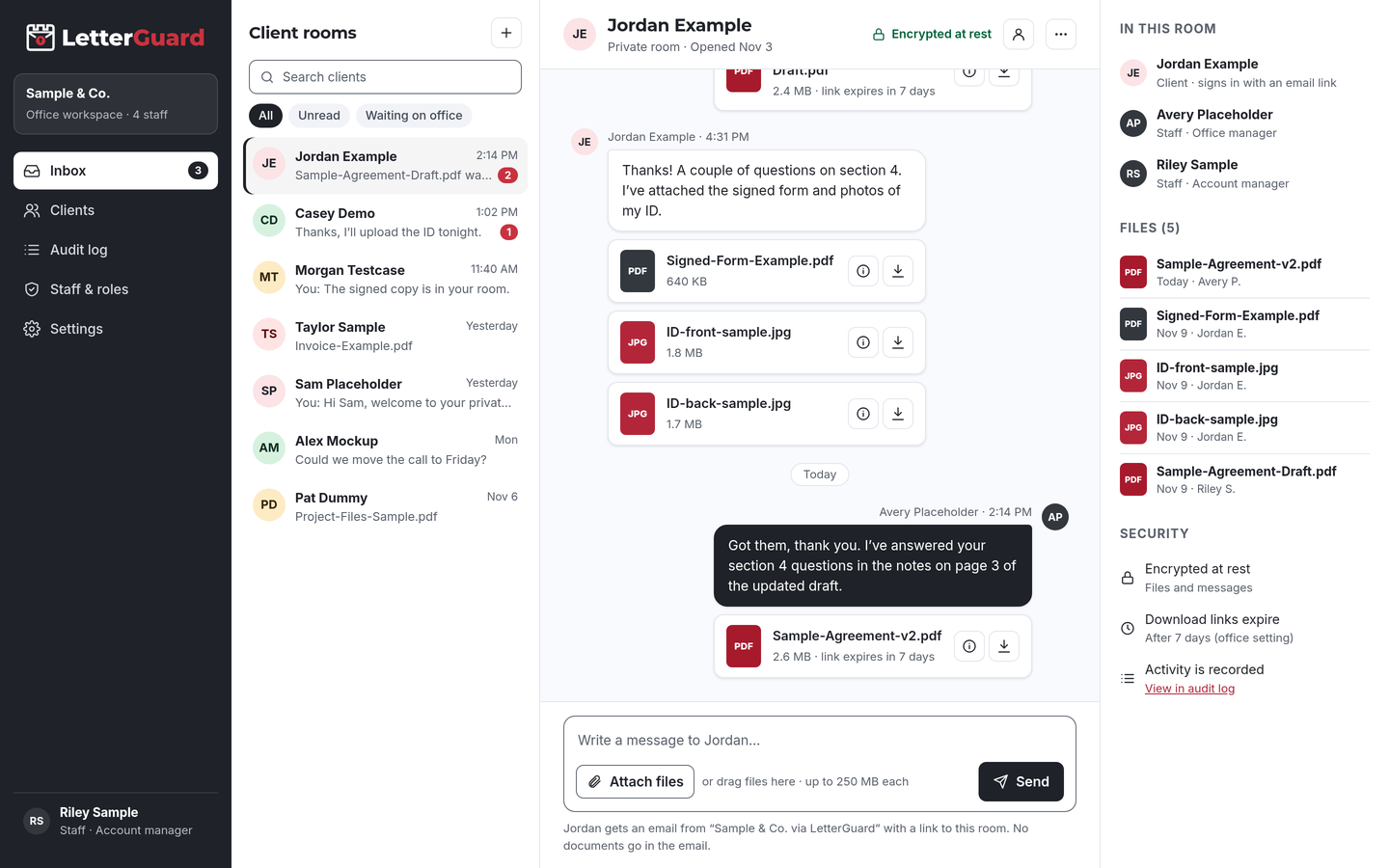
The LetterGuard client room: a list of client rooms, a conversation between office staff and a client with PDF and image attachments, and the room’s members, files and security settings.

The problem

Your client file shouldn’t live in five inboxes

Most small offices run client communication through the same tools they use for everything else. It works, until a matter gets busy.

  • Documents scatter

    The ID came in by text, the tax return as an attachment to the paralegal, the medical records through a shared drive link. Someone has to pull it all together, and nobody is sure which draft is final.

  • Your staff chase paperwork

    Reminder emails, voicemails and “did you get my email?” calls. Missing documents hold up filings and closings, and the follow-up lands on whoever has the least time.

  • Clients reply with sensitive files

    Bank statements, Social Security numbers and medical records arrive as attachments, sometimes from a shared family account or a work email. Old links keep working long after anyone needs them.

  • Email is where fraud starts

    Spoofed messages about settlement funds or closing wires look exactly like yours. Business email compromise accounted for $2.77 billion in reported losses in 2024.Source: FBI IC3, 2024 Internet Crime Report

How it fits your week

Four workflows, start to finish

Keep running your practice the way you do. LetterGuard takes over the part where documents and messages go back and forth with the client.

New client intake and engagement

  1. Once conflicts clear in your usual system, invite the client to their room. Taking on several at once? Invite them in bulk.
  2. The client gets an email from your office, signs in with a one-time code and uploads the intake form and ID from a phone.
  3. Send the engagement letter for signature in the same room. The client signs, and the signed copy stays there.

The outcome

A signed engagement letter and a complete intake file before the first meeting, with nothing sitting in an inbox.

Collecting records and discovery

  1. Post the list of what you need in the room’s conversation: statements, records, photos, correspondence.
  2. The client uploads as they find each item. Executable and macro files are blocked, and Professional plans scan every upload for malware.
  3. New uploads show up in your team’s single inbox for every client room. Follow up on what’s missing in the same thread.

The outcome

One place to see what’s in and what’s still missing, and a record of when each file arrived.

Settlement review and signing

  1. Share the draft in the room. The client previews it in the browser without downloading a copy.
  2. Questions and answers stay in the conversation next to the document, not in a reply-all chain.
  3. Send the final version for signature. Post disbursement details in the room, not in email, and keep confirming any payment instructions by phone.

The outcome

The client understands what they’re signing, the signed copy is on file, and money details stay out of the inbox scammers watch.

Closing out the matter

  1. Export your data to keep with your records.
  2. Download links have already expired, so nothing you shared is still floating around in old emails.
  3. The access record shows who uploaded or downloaded each file, and when, for your plan’s retention period.

The outcome

A clean close: the file is complete, old links are dead, and you can show what was shared and when.

By practice area

The documents your practice actually trades

Each client room handles whatever the matter needs. Here’s how it fits practices where sensitive documents move every day.

  • Family law

    Financial affidavits, tax returns, pay stubs, parenting plans

    Clients upload financial disclosures to a room they sign into with a code, not an inbox a spouse might read. Use an email address only your client controls.

  • Personal injury

    Medical records and bills, accident photos, police reports, releases

    Collect records and photos as treatment goes on, then send the settlement statement and release for signature in the room.

  • Immigration

    Passports, birth and marriage certificates, translations, employment letters

    Keep a long evidence list in one thread, so missing documents are visible before they delay a filing.

  • Estate planning

    Asset lists, deeds, account statements, draft wills and trusts

    Gather the inventory, share drafts for review, and get engagement letters signed. Formal execution still follows your state’s requirements.

  • Real estate

    Purchase agreements, title commitments, deeds, closing documents

    Keep closing documents and payoff details in the room instead of email threads, where wire fraud starts.

  • Criminal defense

    Case documents, mitigation records, character letters, plea paperwork

    Share what you’re permitted to share, collect mitigation material from the client and family, and keep the conversation in writing.

  • Small business

    Formation documents, operating agreements, contracts, amendments

    Invite every owner to the same room, so everyone reviews the same version and signs in one place.

  • Another practice area?

    If your office trades documents with clients, a room works the same way. We’ll walk through your workflow in a demo.

    Book a demo
Works with how you work

Keep your software. Add a room for each client.

There’s nothing to migrate and nothing to connect. LetterGuard works alongside the tools your office already uses.

  • Practice management

    Matters, calendars, time and billing stay where they are. Final documents go into your matter file as they do now.

  • Your email

    Keep using email for everyday mail. Clients get an email notice when there’s something new, and the notice never contains the message or the file.

  • Phone and meetings

    Keep the calls your clients prefer for big decisions. Afterward, the written follow-up and the documents go to the room, where they won’t get lost.

Client confidentiality

Reasonable steps you can point to

Model Rule 1.6(c) asks lawyers to make reasonable efforts to prevent unauthorized access to client information. ABA Formal Opinion 477R explains that what’s reasonable depends on how sensitive the information is, and that highly sensitive matters may call for stronger protection than routine email.

LetterGuard gives your office practical protections to use for those documents, and a record of how files were shared.

LetterGuard doesn’t make your office compliant with any rule, and nothing here is legal or ethics advice. Your obligations depend on your jurisdiction and your matters.

  • Files and messages encrypted at rest
  • Clients sign in with a one-time email code
  • Two-factor login for staff
  • Role-based staff access
  • Download-only files with links that expire
  • A record of who downloaded each file, and when
  • An audit log of account activity
  • Executable and macro files blocked

Compare

Email attachments, share links or a client room

QuestionEmail attachmentsShared drive linksLetterGuard
Where the conversation livesSpread across each person’s inboxEmail, with files somewhere elseOne room per client, messages and files together
Who can open a fileAnyone the email reaches or is forwarded toDepends on how the link was sharedRoom members who sign in with a code
Old links and copiesCopies stay in every inboxLinks work until someone turns them offDownload links expire on their own
Who downloaded whatNo recordVaries by service and settingsRecorded on every file, with the time
SignaturesPrint, sign, scan, or a separate toolA separate toolSigned in the room, with the copy kept there
Risky file typesDepends on your filtersDepends on the serviceExecutables and macro files blocked
What the client needsAn inboxOften an account with the serviceAn email address and a one-time code

Questions law offices ask

What’s the safest way for a law firm to send confidential documents to a client?

Put them somewhere only the client can reach after signing in, rather than attaching them to email. In LetterGuard, files sit in the client’s room, encrypted at rest. The client signs in with a one-time code, files are download-only, and each download link expires. You can also see who downloaded each file, and when.

Can lawyers email sensitive documents to clients?

Often, yes. ABA Formal Opinion 477R says routine email is generally acceptable when you take reasonable precautions, but more protection may be warranted when the information is highly sensitive. Many offices use a client portal for those documents. This isn’t legal or ethics advice; check your state’s rules and opinions.

Does LetterGuard replace my practice management software?

No. Keep your practice management software for matters, calendars, time and billing. LetterGuard works alongside the tools you already use, with nothing to migrate. It’s the private room where you and the client talk and trade documents, and you save the final files to your matter as you do today.

Can clients sign engagement letters and settlement documents in LetterGuard?

Yes. Send the document for signature in the client’s room. The client signs from a computer or phone, and the signed copy and its record stay in the room next to the conversation about it.

How do clients log in without a password?

They enter their email address and type in the one-time code LetterGuard sends them. There’s nothing to install and no password to forget. Your staff sign in with two-factor login.

What happens to a client’s files when the matter closes?

Export your data to keep with your records. Download links expire on their own, so old links stop working, and the access record is kept for the retention period on your plan.

Pricing

Per office, not per seat.

Unlimited staff on every plan, and clients never pay. Plans start at $99/mo.

See plans and pricing

Spend your week on the law, not the paperwork chase

Bring one real matter to a short demo. We’ll show you how intake, document collection and signing would run in a LetterGuard room for your office.

Book a demo